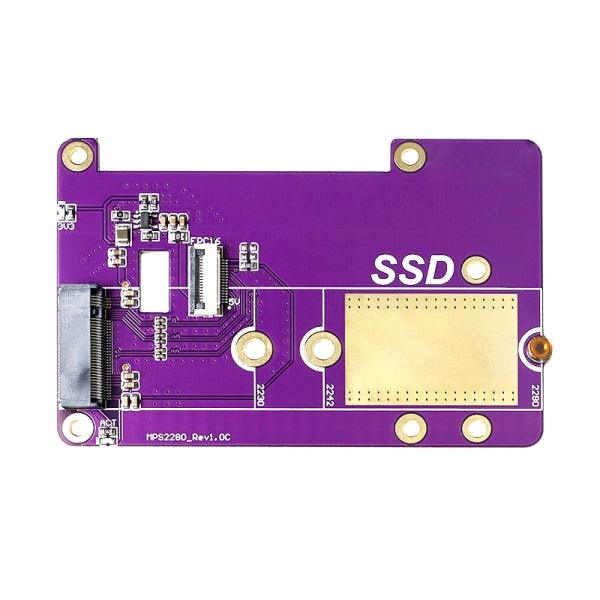
Raspberry Pi 5 M.2 2280 PCIe SSD Adapter Board
Out of Stock
Categories: Raspberry Pi Accessories
Overview
Description
Raspberry Pi 5 M.2 2280 PCIe SSD Adapter Board – High-Speed Storage Expansion Solution
The Raspberry Pi 5 M.2 2280 PCIe SSD Adapter Board is a high-performance storage expansion accessory designed specifically to unlock the full potential of the Raspberry Pi 5. By converting the Raspberry Pi 5’s native PCIe interface into an M.2 2280 NVMe SSD connection, this adapter board enables dramatically faster storage speeds compared to traditional microSD cards or USB-based storage.
This solution is ideal for developers, system integrators, hobbyists, and professionals who require faster boot times, improved system responsiveness, and reliable high-capacity storage for advanced Raspberry Pi applications.
Designed for Raspberry Pi 5 PCIe Architecture
The Raspberry Pi 5 introduces a significant hardware upgrade with its exposed PCIe 2.0 interface, allowing direct connection to high-speed peripherals. This M.2 adapter board is engineered to take full advantage of that interface, providing a stable and direct PCIe-to-M.2 connection for 2280-size NVMe SSDs.
Unlike USB-to-SSD adapters, PCIe-based storage offers lower latency and higher throughput, making it suitable for demanding workloads such as databases, media servers, virtualization, and edge computing.
For more details on the Raspberry Pi 5 hardware architecture and PCIe support, refer to the official Raspberry Pi documentation:
https://www.raspberrypi.com/documentation/computers/raspberry-pi-5.html
Support for M.2 2280 NVMe SSDs
This adapter board supports M.2 2280 form factor SSDs, which are widely available and offer a broad range of capacities and performance levels. NVMe (Non-Volatile Memory Express) is designed specifically for high-speed storage over PCIe, delivering significantly better performance than older SATA-based solutions.
You can learn more about NVMe technology and its advantages from this technical overview by Kingston:
https://www.kingston.com/en/blog/pc-performance/what-is-nvme
Improved Performance and System Responsiveness
By booting and running the operating system directly from an NVMe SSD, users can experience:
-
Faster boot times
-
Higher read/write speeds
-
Improved multitasking performance
-
Reduced I/O bottlenecks
-
Greater system stability under load
These benefits make the Raspberry Pi 5 M.2 PCIe SSD Adapter Board an excellent choice for applications such as home servers, NAS systems, AI inference at the edge, development environments, and industrial control systems.
Reliable Power and Signal Integrity
The adapter board is designed with high-quality components to ensure stable power delivery and signal integrity between the Raspberry Pi 5 and the NVMe SSD. Proper PCB layout and PCIe signal routing help maintain reliable communication even during sustained high-speed data transfers.
Depending on the SSD used, an external or auxiliary power solution may be recommended to ensure consistent operation, especially for higher-capacity NVMe drives.
For general information on PCIe technology and how it impacts data transfer performance, you can refer to this resource from Intel:
https://www.intel.com/content/www/us/en/io/pci-express/pci-express-technology.html
Easy Installation and Integration
The Raspberry Pi 5 M.2 2280 PCIe SSD Adapter Board is designed for straightforward installation. It connects directly to the Raspberry Pi 5 PCIe interface using the appropriate cable or connector, allowing quick integration into new or existing projects. The open hardware nature of the Raspberry Pi ecosystem ensures broad software support and compatibility with popular operating systems such as Raspberry Pi OS and Ubuntu.
Detailed setup guides and community support make it easy for users to configure their system for NVMe booting and storage expansion.
For official guidance on booting Raspberry Pi devices from NVMe storage, refer to Raspberry Pi’s documentation:
https://www.raspberrypi.com/documentation/computers/raspberry-pi.html
Wide Range of Applications
This PCIe SSD adapter board is suitable for a wide variety of use cases, including:
-
High-speed Raspberry Pi 5 boot drives
-
Home lab and server environments
-
Media servers and content streaming
-
Edge computing and IoT gateways
-
Software development and testing
-
Data logging and analytics systems
Its compact design makes it easy to integrate into custom enclosures and embedded systems.
Why Choose This M.2 PCIe SSD Adapter Board?
-
Native PCIe connection for Raspberry Pi 5
-
Supports M.2 2280 NVMe SSDs
-
Significantly faster than microSD or USB storage
-
Improved system reliability and performance
-
Ideal for professional and advanced projects
The Raspberry Pi 5 M.2 2280 PCIe SSD Adapter Board is a powerful upgrade for anyone looking to maximize storage speed and performance on the Raspberry Pi 5 platform. Whether you are building a server, developing advanced applications, or optimizing system responsiveness, this adapter board delivers the speed and reliability modern projects demand.
Data Sheet